
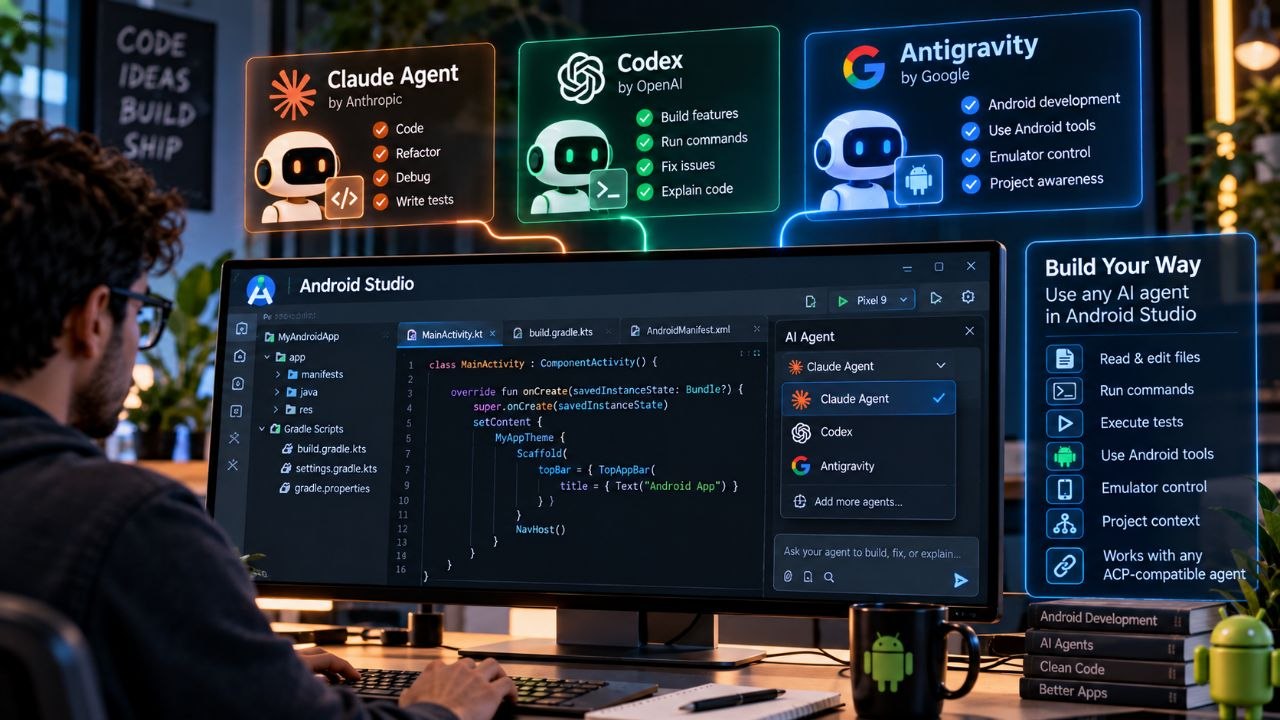
Google is making Android development more flexible for developers who use AI coding tools.
In a September 24, 2026 announcement, Google introduced Bring Your Own Agent (BYOA) support for Android Studio, allowing developers to connect coding agents from different providers directly inside the IDE. The initial supported agents include Anthropic's Claude Agent, OpenAI's Codex and Google's Antigravity.
The change is part of a broader shift in software development from AI assistants that simply answer coding questions toward agents that can inspect projects, edit files, run commands, execute tests and complete multi-step engineering tasks.
Google's approach also means developers do not necessarily have to commit to a single AI provider when working on an Android project.
What Is Bring Your Own Agent in Android Studio?
Bring Your Own Agent, or BYOA, allows developers to connect their preferred coding agent to Android Studio rather than relying exclusively on the IDE's built-in AI experience.
Google says the new system supports Anthropic Claude Agent, OpenAI Codex and Google Antigravity in the preview rollout. It is available in the latest Android Studio Canary release.
The system is built around the Agent Client Protocol (ACP). Google says ACP-compliant agents can connect directly to Android Studio and receive information about the project, including its project graph, build setup and Android platform details.
That gives an external agent more context about the Android application without requiring developers to manually explain the project's structure in every conversation.
Why Google Is Opening Android Studio to Multiple AI Agents
AI coding has become increasingly fragmented.
Some developers prefer Claude for coding tasks. Others use Codex, Gemini-based tools, open models or specialized enterprise agents.
Previously, switching between these tools could mean leaving the IDE, copying project information, configuring another environment and losing some of the context available inside Android Studio.
BYOA attempts to reduce that friction.
Google describes the goal as giving developers more choice over which AI agent they use while still providing Android-specific tools and context inside the IDE.
That could be particularly useful for teams that already pay for multiple AI services or have their own internal coding-agent infrastructure.
Which AI Agents Can Android Studio Use?
The initial preview includes three prominent agents:
Claude Agent from Anthropic
Codex from OpenAI
Antigravity from Google
Google says additional agents can be discovered through the agent registry under Settings > Tools > AI > Agents, provided they are compatible with the supported protocol.
This is important because the system is not designed purely around a fixed list of three models.
Google says developers can connect any ACP-compliant agent, creating the possibility of a larger ecosystem of coding agents over time.
Android Studio Gives Agents More Context
One of the biggest advantages of running an AI agent inside an IDE is access to project context.
Generic coding assistants may know programming languages well but can struggle with rapidly changing platform APIs, build configurations and framework-specific conventions.
Google has been addressing that problem by adding Android-specific skills directly into Android Studio.The stable Android Studio Quail 4 release, for example, includes 23 curated Android skills covering areas such as Android Gradle Plugin upgrades, profiling, Navigation 3 and adaptive layouts.
These skills are designed to give AI agents specialized instructions for Android development instead of relying entirely on a model's general programming knowledge.
How BYOA Uses Android Studio's Project Information
Google says BYOA provides agents with access to the full project graph, build setup and relevant Android platform information through ACP.
The agent can then filter that information to focus on the files and details relevant to the current task. Google says this can improve token efficiency, latency and the quality of responses.
This matters because large Android projects can contain thousands of files, multiple modules and complicated build configurations.
An agent that understands the project structure from the start can potentially spend less time discovering basic information before making a change.
Agents Can Work Directly Inside the Development Environment
Google's new system goes beyond chat.
Agents connected to Android Studio can:
Read files
Write and edit code
Run shell commands
Execute tests
Search the web
Use Android build diagnostics
Interact with Jetpack Compose previews
Control the Android emulator
Delegate tasks to specialized subagents
Google also says developers can configure granular permissions, allowing agents to perform routine operations automatically while requiring approval for riskier actions.
That permission model is becoming increasingly important as coding agents move from suggestions to actual execution.
An AI that merely proposes a code change has limited ability to affect a project. An agent that can execute commands and modify files needs stronger boundaries.
Switching Between AI Agents Could Become Normal
One particularly interesting feature is the ability to change agents during a project.
Google says developers can connect multiple ACP-compatible agents and switch when one reaches its quota or does not perform well enough for a particular task.
For example, a developer could potentially use one agent for a large refactoring job and another for debugging or test generation.
The practical benefit depends on how well different agents preserve context and how much project information is shared between them.
Still, the direction is significant: the IDE becomes the stable environment, while the AI model becomes a replaceable component.
What About Gemini?
Google is not removing its own AI capabilities from Android Studio.
The company says developers will continue to have access to Gemini through the built-in Android Studio agent.
However, Google recommends its Antigravity agent for developers who want access to the latest Gemini models, including Gemini 3.8 Flash, along with increased AI usage quota.
Developers can sign in to Antigravity with a Google AI Pro or Ultra plan, or use Gemini API pricing with an API key.
Enterprise customers using Gemini Enterprise can continue to use either the built-in agent or Antigravity while retaining the security and privacy benefits of Google Cloud.
Android Studio Already Supports Local AI
Google's multi-agent strategy comes on top of another important development: local AI models.
Android Studio Quail 4 introduced native integration with Gemma 4, allowing developers to run supported models locally for AI coding assistance.
Google says the smallest models can run on systems with 12GB of RAM, while machines with 32GB or more are recommended for better performance.
The IDE can download, verify and update the model weights, while its bundled inference engine runs Gemma directly inside Android Studio.
Because the model can operate locally, source code does not need to leave the developer's machine for those workflows.
That creates an interesting range of options inside one development environment:
Cloud-based Google agents
Anthropic's Claude Agent
OpenAI's Codex
Local Gemma modelsOther ACP-compatible agents
Enterprise-controlled AI infrastructure
Android Skills Are Becoming an Important Layer
The agent itself is only part of the system.
Google's Android Skills initiative provides specialized instructions that can help AI agents understand Android-specific development patterns.
The company says Android Studio automatically analyzes a developer's prompt and searches the metadata of installed skills, invoking relevant skills when appropriate.
For example, an agent working on a Gradle upgrade can use the corresponding Android skill rather than relying only on its general training.
Developers can also create custom skills for their own teams and workflows.
Google says Android skills can also be used with AI command-line environments outside Android Studio through Android CLI.
Android CLI Expands the Agent Ecosystem
Google's Android CLI is designed to give developers a terminal-based interface for Android development using the agent and tools of their choice.
The September 2026 release includes faster startup, improved exit codes, headless emulator support and other developer tooling improvements.
Earlier releases also expanded Android Skills support across several external agent environments, including Claude Code, Cursor, Cline, OpenHands, Windsurf, Zed and Devin.
This suggests Google's strategy is broader than simply putting more AI inside Android Studio.
The company is building Android-specific tooling that can work across multiple agent environments.
What Does This Mean for Android Developers?
For individual developers, the biggest benefit is flexibility.
Instead of choosing an IDE based entirely on which AI assistant it provides, developers can increasingly choose the IDE for its development tools while selecting the AI agent separately.
That could make it easier to:
- Start a project with one AI agent.
- Switch to another for a specialized task.
- Use a local model for sensitive code.
- Use a cloud model for demanding reasoning.
- Let Android Studio provide platform-specific tools and context.
- Review and approve changes before they are applied.
The result is closer to a modular AI development stack.
What Does This Mean for AI Coding Competition?
Google's move also reflects how competitive the AI coding market has become.
Anthropic, OpenAI and Google are all developing increasingly capable coding agents. Developers, meanwhile, may not want to lock themselves into one provider.
By opening Android Studio to multiple agents, Google is effectively making the IDE a common workspace where competing AI systems can operate.
That could benefit developers because competition can happen at the agent level while Android Studio continues to provide the underlying platform tooling.
It may also encourage AI companies to compete on factors beyond model benchmarks, including reliability, tool use, context management, cost and integration quality.
Security and Permissions Still Matter
Greater agent freedom also introduces greater risk.
An agent capable of editing files, executing shell commands and interacting with an emulator can potentially make changes beyond what a developer intended.
Google's granular permission controls are therefore an important part of the BYOA design. The company says agents can operate autonomously for routine tasks while pausing for approval on higher-risk actions.
Developers should still review permissions carefully, especially when connecting third-party or custom agents to private repositories and credentials.
The ability to connect an agent does not automatically make that agent trustworthy.
How to Get BYOA in Android Studio
Google says BYOA support is rolling out in preview through the Android Studio Rabbit 2 Canary release.
The basic setup process is:
- Install or update Android Studio using the Canary release channel.
- Open the agent window inside Android Studio.
- Select an available agent, such as Claude Agent, Codex or Antigravity.
- Sign in or provide an API key, depending on the provider.5. Add additional agents through the agent registry if required.
- Configure permissions before allowing agents to execute project operations.
Google says both enterprise and consumer AI plans are supported, subject to the individual agent provider.
What Happens Next?
The most interesting part of Google's announcement may be what happens after the initial preview.
If ACP-compatible agents become widely available, developers could eventually treat AI agents more like interchangeable tools inside their IDE.
One project could use a proprietary enterprise agent. Another could use an open-source model. A third could use a local model for privacy-sensitive work.
Android Studio would remain the common development environment.
The model becomes a component rather than the entire workflow.
That could be an important architectural shift for AI-assisted programming.
Final Takeaway
Google's new Bring Your Own Agent support gives Android developers more freedom to choose how AI participates in software development.
The preview allows Android Studio users to connect Claude Agent, OpenAI Codex and Google Antigravity, while the ACP-based architecture is designed to support additional compatible agents. These agents can use Android Studio's project context, Android-specific skills, build diagnostics, emulator controls and other development tools.
The move also builds on Google's existing work with Android Skills, local Gemma models and Android CLI, creating a broader ecosystem where cloud, local and third-party AI agents can participate in Android development.
For developers, the practical message is simple: Android Studio is becoming less tied to a single AI assistant and more like an open workspace for agentic development.
As coding agents become increasingly capable, that flexibility could become just as important as the underlying AI model itself.
Frequently Asked Questions
What is BYOA in Android Studio?
BYOA stands for Bring Your Own Agent. It allows developers to connect compatible third-party coding agents directly to Android Studio instead of relying only on the IDE's built-in AI agent.
Which AI agents work with Android Studio BYOA?
The initial preview supports Anthropic's Claude Agent, OpenAI's Codex and Google's Antigravity. Google says additional ACP-compatible agents can also be connected through the agent registry.
Is Android Studio BYOA available now?
BYOA is rolling out in preview through the Android Studio Rabbit 2 Canary release. Developers need the Canary channel to access the feature during the preview.
Can AI agents run commands and tests in Android Studio?
Yes. Google says connected agents can read and edit files, run shell commands, execute tests, search the web and use Android Studio tools such as build diagnostics, Compose previews and emulator controls.
Can Android Studio run AI models locally?
Yes. Android Studio Quail 4 includes native integration with Gemma 4 for local AI coding assistance. Google says supported local agents can perform multi-file refactoring completely offline, keeping source code on the developer's machine.
Does Android Studio still support Gemini?
Yes. Google says the built-in Gemini experience will continue. It also recommends the Google Antigravity agent for access to newer Gemini models and additional usage quota.
Image SEO Alt Text: Android Studio using multiple AI coding agents including Claude Codex and Google Antigravity Image Caption: Google's Bring Your Own Agent feature lets Android developers connect multiple AI coding agents directly inside Android Studio.